How to use Premium Code
If you have received a coupon or code for Keyguides Connect Premium this is a guide for you. You can either have a look at the image or learn from the steps below.
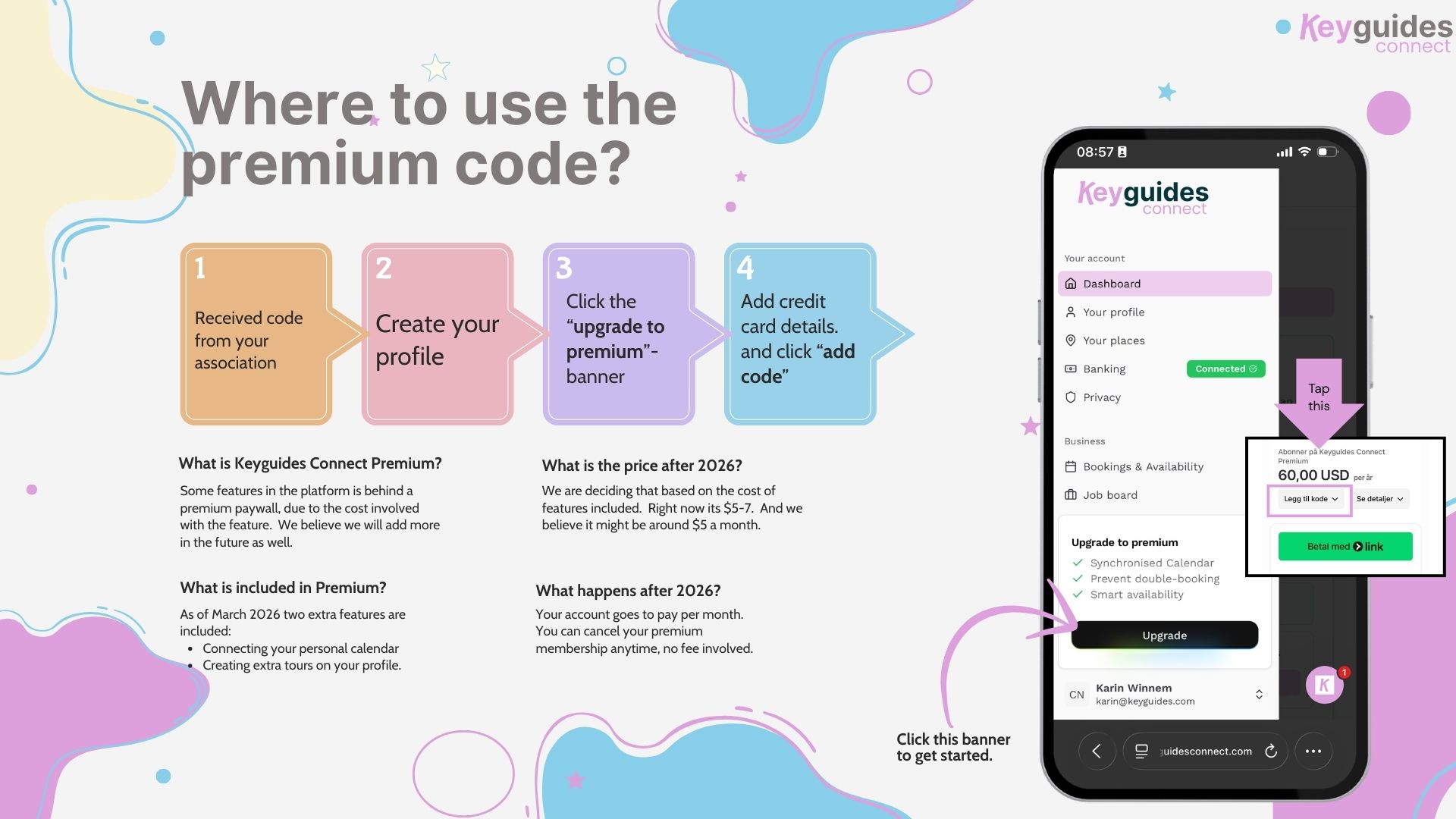
Where to use the premium code
If you have received a premium code from your association, you can use it when upgrading your account.
Steps
Create your profile on Keyguides Connect.
Click the “Upgrade to Premium” banner on the platform.
Add your credit card details.
Click “Add code” and enter the premium code you received.
What is Keyguides Connect Premium?
Some features in the platform are behind a Premium paywall because they involve additional platform costs.
As of March 2026, Premium includes two extra features:
Connecting your personal calendar
Creating additional tours on your profile
More Premium features may be added in the future.
What happens when you activate Premium?
Your account becomes a monthly subscription.
You can cancel your Premium membership at any time.
There are no cancellation fees.
What will the price be after 2026?
The final price will depend on the cost of the features included.
Currently the expected range is $5–$7 per month, and the goal is to keep it around $5 per month.