Review applications and select a guide
This guide applies to requests sent using Apply & Select. With this model, you need to choose who gets the job.
Steps
Open Your Bookings → Pending.
Open the request you want to follow up on.
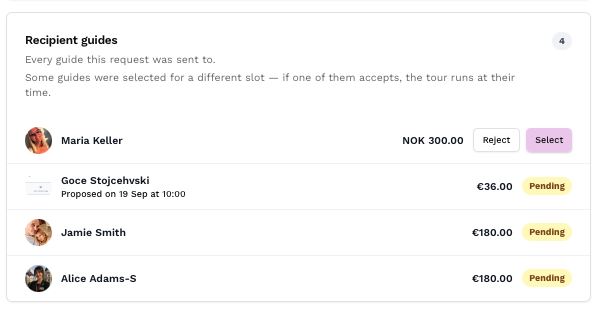
Review the recipients and their response statuses. You can see which guides have applied, declined or not yet responded.
Review the applicants and select the guide you want. You can choose as soon as a suitable guide applies; you do not need to wait for every recipient to respond.
If you want to reject an application, use the rejection option next to that guide. You will have the option to write a message explaining your decision.
What happens when you select a guide?
The other guides are automatically rejected, and the booking moves to Upcoming. Check the payment status and follow up on any Pay now action if you chose card payment.
Guides can withdraw their applications before you select them. Follow up with suitable applicants when you are ready to decide.
With First Come, First Served, the job is assigned automatically when the first guide accepts. The requests to the other guides then expire, so you do not need to choose between applications manually.
Sources
Reviewing applications (1:51–3:05)
Related Articles
Understand the difference between First Come, First Served and Apply & Select when sending booking requests on Keyguides Connect.