Choose how a guide is selected
When you review a booking request before sending it, you choose how the job will be assigned. Both models are available whether you use guides' listed prices or offer your own price.
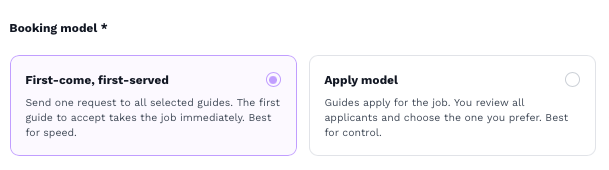
First Come, First Served (FCFS) | Apply & Select | |
|---|---|---|
How does a guide get the job? | The first guide to accept gets the job. | Interested guides apply. You choose who gets the job. |
When is it useful? | When assigning a guide quickly is your priority. | When you want to compare applicants before deciding. |
What do you need to follow up on? | Check booking and payment status. | Review applications and choose a guide, then check booking and payment status. |
How to choose
Open the request review screen using Review request (after you have selected guides in either Book a guide or Create a Request)
Choose First Come, First Served if you would be happy for any of the selected recipients to get the job. Check that each recipient's price and time work for you before sending.
Choose Apply & Select if you want to consider factors such as price, ratings and experience before assigning the job.
Complete the remaining request details and send it.
With Apply & Select, you do not have to wait for everyone to respond before choosing a guide. However, a guide may withdraw their application if they receive another booking. An application therefore does not mean you have already secured that guide.
Sources
Related Articles
Find out how to review guide applications and choose who gets the job when using the Apply & Select booking model.
Use Create a Request to set your own price for a guiding job. Send requests to multiple guides at a price you choose.
Learn how to use Book a Guide to find and book guides at their listed prices. Send requests to multiple guides in one batch.